AI Photo Analysis: What It Sees and How Reliable It Is
 by Marco Carotenuto · · 7 min read
You upload a photo and get back a score and four confident sentences. The natural question follows: can I believe it? The honest answer is “it depends on what you ask”. On some things AI reads a photo well, on others it guesses, and on one thing it is almost always too kind.
This guide covers what an AI photo analysis actually reads, a criterion-by-criterion table of where to trust it and where not, and three checks you can run in ten minutes to see whether a score holds up. If you’re missing a yardstick for judging a photo in the first place, start with how to tell if a photo is good.
What does an AI photo analysis actually see?
It sees the image as pixels and learned patterns: where the horizon falls, where the brightest area is, how far the subject separates from the background, whether the highlights are clipped, which colors dominate. It doesn’t see the place, the moment you shot it or why you pressed the shutter.
Models that estimate how good a photo looks are trained on human ratings. A well-known example is NIMA from Google Research, trained on AVA, a collection of about 255,000 images, each rated on average by about 200 people on a 1-to-10 scale. The model learns to predict that average score. It doesn’t “understand” the photo; it reproduces how a large group of people, mostly amateur photographers taking part in online contests, would have scored it.
That explains the strengths (recognizable visual patterns, consistent criteria) and the main limit: an AI trained on human scores can’t be more certain than the humans it learns from.
Which criteria can you trust AI on, and which not?
Trust it most on what you can observe in the frame, and least on what depends on you or on the viewer. The table follows the six criteria Framia uses. The reliability column is our own judgment, based on common sense and experience, not something measured in a test:
| Criterion | Reliability | Why |
|---|---|---|
| Technique | High | Blown highlights, missed focus and a tilted horizon are visible facts. Watch out for slight camera shake and noise: in a file downsized for upload they may not show |
| Composition | Medium-high | Balance, lines, horizon and subject placement read well. If you break a rule on purpose, it may flag it as a mistake |
| Color | Medium | Color casts, saturation and color contrast are measurable. Your taste and your screen are unknown |
| Light | Medium | Direction and hardness show. Knowing whether the light was “right” for that place and hour needs context |
| Optics | Medium-low | Perspective and depth of field can be read, but the real focal length and aperture are often unknown: the AI infers, it doesn’t measure |
| Story | Low | Emotion, intent and meaning depend on the viewer and on what you meant to say. AI describes the cues of emotion, not the effect |
Venture Photography Workshops makes the same point about AI critique: it’s consistent on technical building blocks, but it can’t feel nostalgia or tension and it doesn’t know which conventions you broke deliberately.
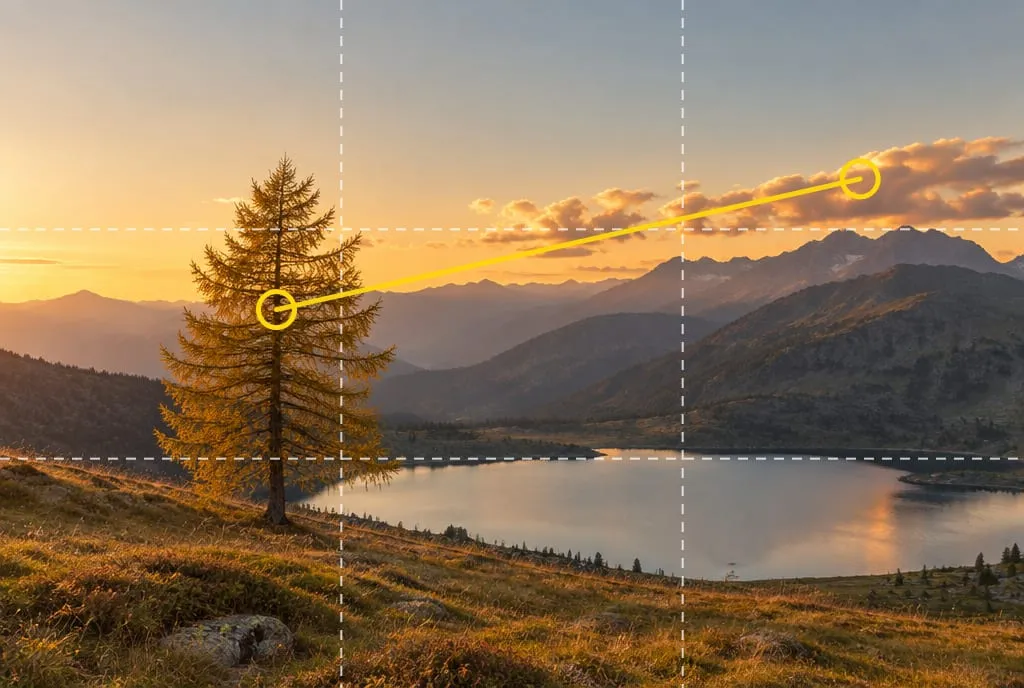 What an analysis can measure: the larch near the left thirds line and the bright clouds on the right, the lightest area, pulling the eye. Why you chose that hour is something only you know. Generated image to illustrate the concept.
Why are AI scores almost always generous?
Because these systems are built to be polite and encouraging, and without precise instructions they open with compliments and end with soft suggestions. The Venture article describes it well: ask for general feedback and you get general praise; give no context and the tool compensates with safe positivity.
The practical risk is score compression: everything lands between 75 and 85 and the number stops telling you anything. Two defenses work:
- Fixed anchors. Use a scale where each band means something. On Framia’s scale, for example, a competent but ordinary shot scores between 55 and 69, and that is the normal band for a good amateur photo: a 62 is not a fail. The full scale is in how to tell if a photo is good.
- Specific requests. Ask for the most serious flaw first, and for a strength only when it’s tied to a concrete element of the image. Mind the flip side: if you ask for “brutal” feedback, it will hunt for flaws even where there aren’t any.
Is an AI score a measurement or an estimate?
It’s an estimate, with a margin of error. In the NIMA paper, the authors note that for roughly half of the AVA photos the standard deviation of the ratings is above 1.4 points out of 10, and that photos with widely spread ratings are presumably the ones more open to interpretation. If the people who rated a photo disagreed with each other, no model can return a “true” number.
In practice: don’t read a 74 against a 71 as an improvement. Read the bands (below 55, 55 to 69, above 70) and above all the lowest criterion, which is the most stable and most useful piece of information. For why to look at the minimum and not the average, see the section on the most common mistake in how to tell if a photo is good.
How do you check an AI analysis in 3 tests?
With three checks you can run on any tool, Framia included, in about ten minutes. They tell you how far to trust that score; they don’t prove a machine right or wrong:
| Check | What you do | What it tells you |
|---|---|---|
| 1. Repeatability | Analyze the same photo twice, the second time in a new session or a few hours later | If the lowest criterion changes every time, its verdict is noise. If it stays the same and the scores move only a little, that’s a good sign |
| 2. Sentinel photo | Take one of your own photos with a flaw you know for certain (camera shake, blown sky, tilted horizon) and run the same analysis | The flaw should be found and penalized under the right criterion. If it misses it, that criterion isn’t reliable for you |
| 3. Mirror | Flip the same photo horizontally and analyze it again | The flaws flagged should stay the same; scores may shift slightly, because reading direction matters. If the judgment flips, be suspicious |
One check doesn’t replace testing across many photos, but it removes the feeling of having to take it on faith. If a tool passes checks 2 and 3, use it for what it does well: showing you where to look.
When should you use AI and when a person?
Use AI for a first pass and for comparing many photos with one yardstick; use a person when the question is about intent. They work best together:
- With AI: finding the lowest criterion; checking exposure, horizon and balance; comparing shots from the same outing; getting an opinion at any hour, without feeling self-conscious.
- With a person: judging whether the photo says what you meant, picking images for a series, preparing a portfolio or a contest entry, getting feedback that accounts for your progress.
Framia works this way: it returns a score and an explanation for each of the six criteria (composition, light, optics, color, story, technique) and points out the weakest category to work on. That holds for Framia as for any other tool: the score describes what is visible in the image, and only you know the intent. To bring the result to a person in a useful way, use the four-line brief described in photo critique: how to ask for it and actually use it.
If the lowest criterion is always the same one, it may be worth finding the cause: if it’s light, for example, why photos look flat gives you four tests to pin it down.
What to do next
A 15-minute exercise to test an AI analysis on one of your own photos:
- Pick one of your photos at least a week old and, before seeing any result, write your own scores for the six criteria and which one you think is lowest.
- Run the analysis with the tool you use (Framia works too) and note the scores and its lowest criterion.
- Do check 1: analyze the same photo again a few hours later. Is the lowest criterion still the same?
- Do check 2 with a flawed photo you already know, and see whether the flaw was found.
- Do check 3: flip the first photo, analyze it again and compare the flaws flagged.
- Compare your scores with the tool’s: the biggest gaps are where your eye and its reading don’t match. Take the photo to an experienced person on those.
If you want a criterion-by-criterion analysis to put to the test, upload the photo to Framia and compare its lowest criterion with the one you wrote down in step 1.
FAQ
Can AI tell me if a photo is good?
It can tell you whether a photo works on the criteria visible in the frame (composition, light, color, technique) and where the flaws are. "Good" also includes taste and emotion, where people disagree too: in the dataset used to train one of the best-known models, the scores people give spread by more than 1.4 points out of 10 for about half of the photos.
Is ChatGPT accurate for rating my photos?
For a first technical read, yes, as long as you give it context and tell it to skip generic compliments. Without context it tends to give a generic, positive critique. Treat it as a second reading and run the three checks in this article before trusting its scores.
Can an AI photo analysis tell me whether a photo was made by AI?
No, those are different tools. An AI image detector estimates the probability that an image was generated or edited; a photo analysis judges how the shot is made (composition, light, color, technique). Neither gives a certain verdict.
Can AI replace an experienced photographer or critic?
Not fully. AI is always available and repeatable, which makes it great for a first pass and for comparing shots from the same outing. An experienced person judges story, intent and the coherence of a series better, and can follow your progress over time.
Is it safe to upload any photo to an AI tool?
Read the terms first: some services may use uploaded images to train their own models. If a photo is sensitive (identifiable people, children, client work), check what the service says, or don't upload it.